
Chrome DevTools MCP vs. harness-fe
I want to be fair to Chrome DevTools MCP, because it's good — and because the fair comparison is the one that actually tells you which tool fits which problem.
Let me start with the problem, then give DevTools MCP full credit, then show the two places where I needed something different and built it.
The pain that started this
Three situations kept burning me:
- QA hits a bug; by the time I pick it up, the first scene is gone. The logs, the network, the state at the moment it broke — none of it survived.
- Multi-account testing means juggling different accounts across browser instances / Chrome profiles, switching back and forth.
- Mobile testing, where collecting logs is so expensive you fall back to screenshots, screen recordings, and pointing a camera at the screen.
What I actually wanted: QA reports a bug, and the agent itself already knows what the first scene was — can even reconstruct it — then correlates it with the code, locates the problem, fixes it, and drives the browser to verify the fix. No human relaying logs in the middle.
There's a real reason to take the human out of that middle. Per a Caltech 2024 study, The unbearable slowness of being, humans process information at roughly 10 bits per second. A session timeline carries far more detail than a sentence of "the button doesn't work" ever will — and when a person relays a bug, they unconsciously filter and reshape it.
Credit where it's due: Chrome DevTools MCP
Chrome DevTools MCP is the official answer from the Chrome team to exactly the blind spot they named — that agents are "effectively programming with a blindfold on." It gives an agent genuine live-browser power:
"Inspect the DOM and CSS on live pages; Analyze network requests and console logs; Record and analyze performance traces; Navigate, fill forms, and click buttons to simulate user behavior."
And it genuinely closes part of the loop — the Chrome team lists "verify code changes work as intended automatically," "reproduce bugs by simulating form submission workflows," and "diagnose why images aren't loading by analyzing network requests." If your problem is "drive the tab in front of me and tell me what's happening right now," DevTools MCP is an excellent, first-party tool. Use it.
So this isn't "DevTools bad." It's: its working model is "the agent remote-controls the one tab I've attached to, and reads what it can see in this moment." That model has two edges I kept falling off.
Edge 1: the information I needed was in the past, or another tab
All three of my pain points share a shape: the information is not in the tab in front of the agent right now. It's in the past (QA's already-closed session), or it's scattered across instances (the other profile), or it's on a device that isn't here (mobile).
DevTools MCP observes on demand. A harness observes passively and persistently. harness-fe installs a runtime in every browser the dev cluster touches and keeps a structured session timeline in a local daemon — so the scene survives a reload, an HMR restart, a tab switch, and the gap between "it broke" and "the agent looked." The difference isn't capability-per-tab; it's whether the scene still exists when the agent arrives.
Edge 2: the stack trace pointed at bundled code, not my source
This one is concrete and, as of late 2025, documented. Chrome DevTools MCP's list_console_messages returns stack traces that point at the bundled / transpiled file and line numbers — not the source-mapped original location — even when the bundle ships valid sourcemaps (ChromeDevTools/chrome-devtools-mcp #695). As that issue puts it, this "makes it difficult to debug production-bundled code or any code that relies on sourcemap mapping for readable stack traces."
So even when the agent can see a runtime error, the trail back to your code goes cold at vendor.a3f9.js:1:88421. The agent still has to guess which of your components that is.
harness-fe attacks this from the other side — at build time, not read time. The build plugin stamps every JSX element with its origin (data-morphix-loc="src/Form.tsx:42:8"). The agent sees an element and already knows the source location — no sourcemap round-trip, no grep, no react-devtools. "This button" is Form.tsx:42 directly.
A real session: "the user keeps getting logged out"
Here's the loop in practice — the kind of intermittent bug where the first scene is everything.
The agent doesn't reach for a breakpoint. It queries the timeline for who removed the token:
> storage_tail({ op: 'remove', key: 'auth_token' })Every event in harness-fe carries its initiator.stack. The returned removal event has one — and the top user-code frame points straight at the file and line that cleared it. No reproduction, no "add a log and wait for it to happen again." From there: jump to the source line via data-morphix-loc, propose the fix, then drive the browser back through the flow and confirm the token survives. Report → fix → verify, closed by the agent.
That's the same describe-check-fix loop the whole industry is stuck in — except the agent is doing the describing to itself, from a structured record, instead of waiting on me to copy-paste.
How it's built
harness-fe is three layers:
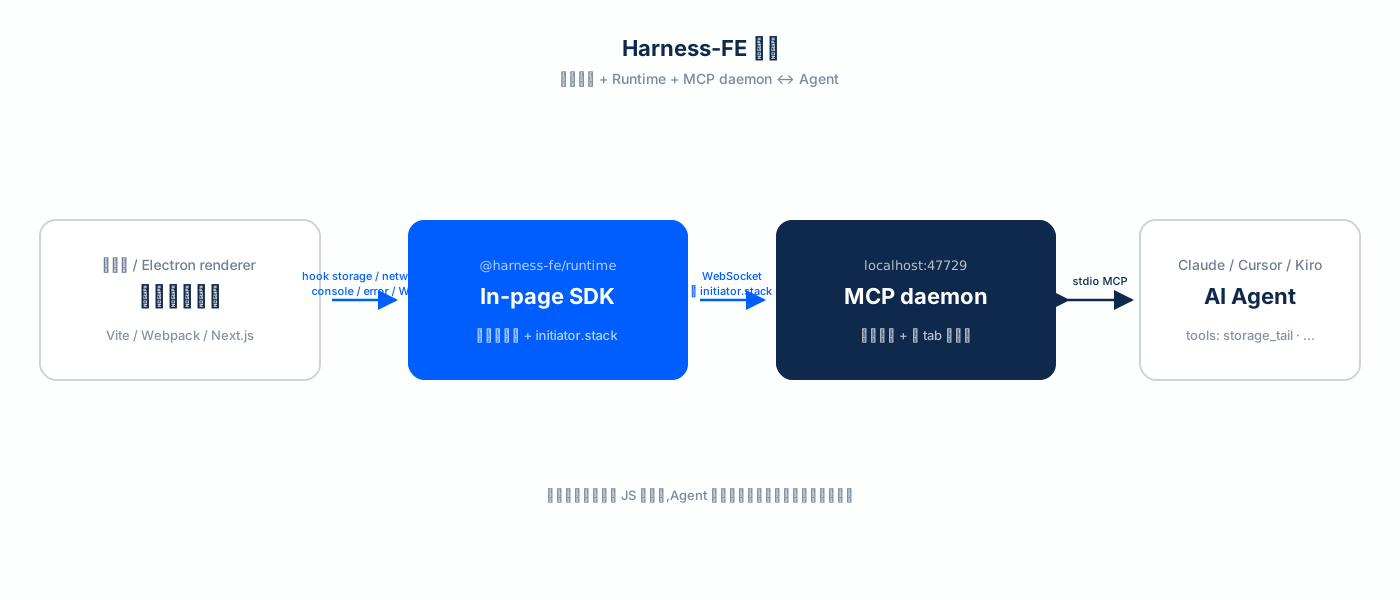
Build plugin — @harness-fe/vite / @harness-fe/webpack / @harness-fe/next instrument source at bundle time, adding the data-morphix-loc source tag to every element. This is the half DevTools MCP can't replicate from the outside: it needs the build step.
Runtime — @harness-fe/runtime is an in-page SDK that hooks every side effect: console, network (fetch / XHR), localStorage / sessionStorage / cookie writes, WebSocket frames, navigation, uncaught errors, rrweb DOM recording. Every event carries a JS call stack (initiator.stack).
MCP daemon — a local long-running process (default localhost:47729). All data lives in the daemon, so it survives across tabs, dev-server restarts, and HMR. The agent connects over stdio MCP and queries with storage_tail / network_tail / session_tail / project_where_is / session_recordings_around and ~40 other tools.
The root difference from DevTools MCP, in one line: information is captured passively and persisted, rather than only visible when the agent attaches to the current tab.
It's not an APM
The harness-fe runtime is injected only in dev builds; it does not exist in your production bundle. Zero runtime overhead, zero privacy concern. It doesn't replace Sentry / Datadog — it's the tool for the stage where you and the agent debug local code together.
Honest about where this is
The solo-developer flow above is solid today (main / npm latest). The team flow — QA, PM, and dev all connected to one self-hosted daemon, so the agent can claim a QA-filed bug the instant it happens — is further along the roadmap, with the identity and tenant-isolation layer maturing. I write that openly on the roadmap because harness-fe is trying to be more than a tool — it's an attempt at a harness-shaped frontend workflow, and that's not something one person finishes alone.
Try it
npx @harness-fe/skill installThen ask your agent: "Set up harness-fe in this project."