

Source-aware, to the line
Every element carries its JSX source location. The agent knows which file and line to edit — no guessing, no grep. The part no debugger gives you.
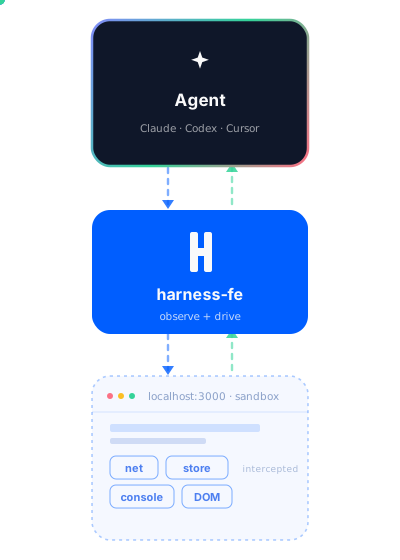
A dev-time harness that lets an MCP agent see your frontend's console, network, and DOM, drive the page, and trace every element back to the exact file and line. Report → fix → verify, in one loop.
Every element carries its JSX source location. The agent knows which file and line to edit — no guessing, no grep. The part no debugger gives you.

Console, network, WebSocket, errors, and rrweb DOM recordings — streamed to your agent in real time. Replay any session to see exactly what happened.

The agent can click, type, navigate, and evaluate — behind a consent gate the user controls. Opt in per app, or block it with one tap.

Works with Claude Code, Cursor, Kiro, Windsurf, and any MCP-aware client. One server, 45+ tools, stdio or HTTP.

One shared gateway, scoped tokens, caller identity, and tenant isolation — teammates don't collide and each only sees their own projects.

The runtime ships only in development. Zero production overhead, zero telemetry to third parties, no accounts or API keys to start.
harness-fe isn't a production monitor and isn't a general-purpose browser bot. It's the missing layer that turns an AI coding agent into one that can see what your app is doing, drive it, and know exactly which source line to fix — then prove the fix by replaying the flow. Drop in one build plugin, point an MCP-aware agent at it, and the report → fix → verify loop closes itself.
Other tools each cover a slice. harness-fe is the one built end-to-end for the developer's agent loop — source-aware, full-stack, and dev-only.
| harness-fe | Chrome DevTools MCP | browser-use & co. | Sentry / LogRocket | |
|---|---|---|---|---|
| Built for | dev-time agent loop | browser debugging | end-user task agents | production monitoring |
| Source-aware (file : line) | ||||
| Report → fix → verify loop | ||||
| Full-stack observability¹ | ||||
| Drive the page (agent) | ||||
| Session replay (rrweb) | ||||
| Multi-bundler / framework² | ||||
| MCP-native | ||||
| Dev-only · zero prod footprint | ||||
| Team isolation + governance |
yes · partial / conditional · no · n/a | ¹ console + network + WebSocket + errors + DOM recordings · ² Vite · Webpack · Rspack · Next.js · Vue · React
Three minutes to your first agent-driven session → Quickstart · Team mode · Migrating from 3.x